A clear schedule. A team ready to care.
Manage daily operations, or use SpaMatch alongside your existing software to find external staff.
Set up my spaMORE CLARITY FOR YOUR SPA. MORE OPPORTUNITY FOR YOUR TEAM.
Bring bookings, people and checkout together. Find internal capacity or request external technicians, with clear skills, availability and agreement at every step.
Register interest in the spa pilot
Full spa operations or external staffing only — you choose.
See what SpaMatch can do for youSee your next working day

Manage daily operations, or use SpaMatch alongside your existing software to find external staff.
Set up my spaReview pay, dates and requirements, choose your availability, and decide which invitations suit you.
Create my technician profileYOUR SPA. YOUR WAY OF WORKING.
Bring your daily operations together, or keep your current software and use SpaMatch to request extra staff.
Connect bookings, rooms, customer records, your team and checkout in one workspace.
Choose external staffing only when you want extra hands without moving your day-to-day operations.
The spa owner chooses the operating mode during setup and can manage it later. See the owner walkthrough
Use editable spa presets or review service drafts from a menu, photo or permitted website import.
Where enabled and supported by the browser, voice instructions prepare a booking draft for you to check before saving.
Contextual help, role-specific training and clear next steps help a small team work with confidence.
SpaMatch
Two short films. Choose the story that fits you. Narrated in English with captions and a full transcript; Vietnamese versions are available with the language selector.
For spa operators 4:32
Bookings, staffing, onboarding and checkout, shown on real application screens.
Press play to watch. Use CC for captions, or read the transcript below.
The video could not be loaded. Please use the download link or read the transcript.
A busy spa needs more than a diary. SpaMatch connects the people and work behind each appointment. Choose full operations for bookings, customer records, your team and checkout. Or keep your current software and use external staffing only. The spa owner chooses the approach that fits the business.
When a guest asks what is available, begin with the time and the treatments they want. The Booking Wizard checks the resources needed for the service. Choose a suitable result, review the details and confirm through the booking form. Reception spends less time moving between separate lists, while the operator stays in control.
This view separates internal staff who are available, extra hours needing acceptance, external staffing gaps and sessions already staffed. Use the external filter to focus on the remaining shortages. A treatment needing two practitioners still needs cover if only one internal person is suitable. Suggestions do not reserve a person or guarantee an external match.
Describe the work, the time, the area and the pay. The matching control explains how additional skills affect the search, while mandatory skills remain required. Review evidence and response history before inviting a technician. Saved service pay limits support later external searches. A technician still needs to agree, and availability is checked again before acceptance.
Setting up should build on work you have already done. Choose an editable spa preset or prepare service drafts from menu text, a PDF or a phone photo. A permitted website import is another optional source. Check the treatment names, durations and prices before applying anything. Rooms, staffing and further setup can be completed in manageable steps.
When enabled by the administrator and supported by the browser, voice instructions can help prepare an appointment draft. The screen shown explains the input and review controls; it is not a recording of live speech recognition. Check the guest, treatment, room, date and time, then save deliberately. Ordinary typed booking remains available.
After the treatment, add skincare products to the same sale and review the totals. Service lines, retail stock and recorded payments stay connected. Discounts and earlier deposits can be reviewed in the relevant workflow. The example is a fictional sale, not evidence of a bank transfer. Live payment processing depends on the provider configured for the spa.
Some treatments involve more than one practitioner. The commission editor lets an authorised operator review how a sale line is shared, instead of assigning the whole contribution to one person. Connect those records to the team's earnings review. Payroll exports support a handoff for checking; they do not replace country-specific statutory payroll or tax advice.
An owner who also manages reception can switch to the working view needed for the task. Contextual help explains the screen, and role-specific training is linked from the website. Start with the operations your spa needs today, then configure optional modules as you grow. Explore SpaMatch and create a workspace for your spa.
For technicians 3:32
Profile, availability, placement choices and skills development, shown step by step.
Press play to watch. Use CC for captions, or read the transcript below.
The video could not be loaded. Please use the download link or read the transcript.
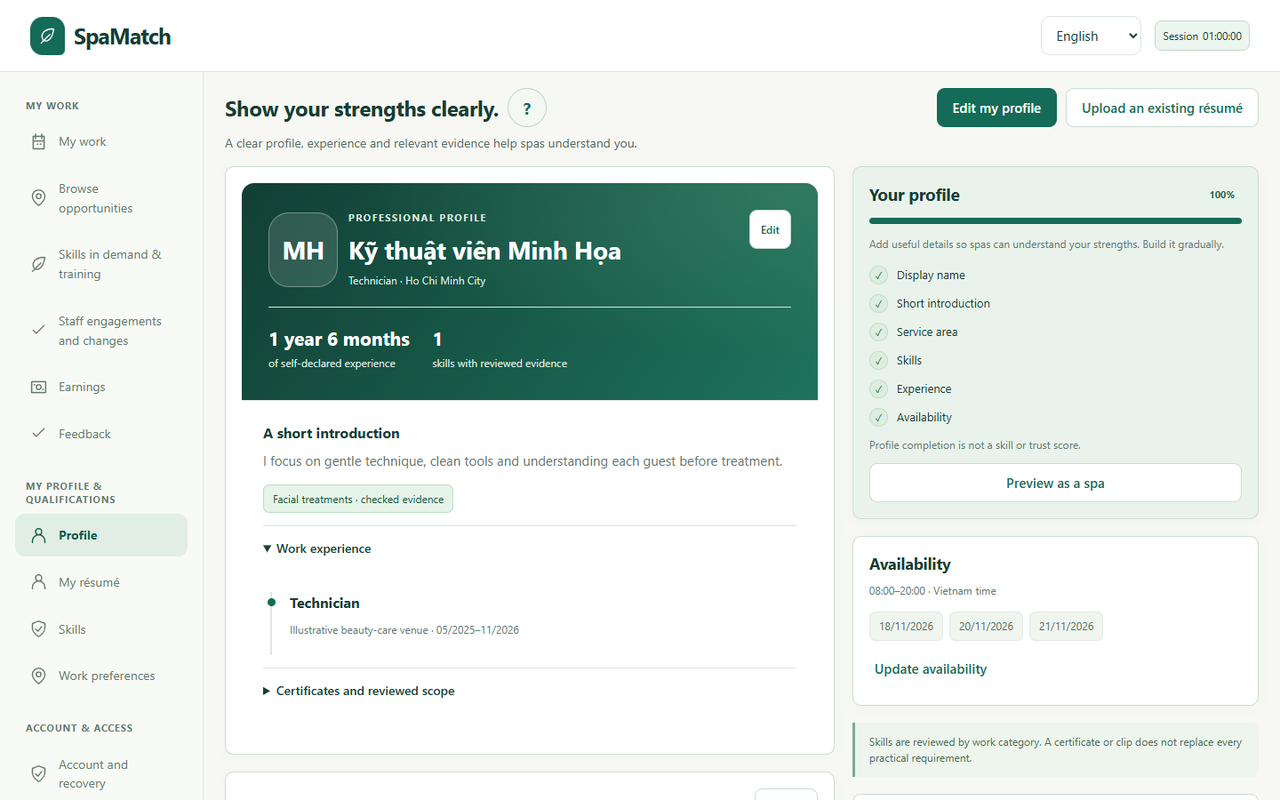
Your skills deserve a clear introduction. SpaMatch gives technicians a professional profile for their experience, service areas and evidence. A few months of experience can be recorded accurately; you do not need to round it up to a year. A useful profile helps a spa understand your strengths and what still needs verification.
Keep your treatment skills and experience current. Add supporting evidence through the verification workflow, with its status shown clearly. A claim you enter yourself is different from reviewed evidence. Matching still respects each placement's mandatory skills, training and experience requirements. Clear information helps both sides make a better decision.
Set the areas you can serve, keep availability up to date and review your pay preferences. Tell the platform when you are busy, rather than leaving an inaccurate open calendar. Accepted commitments are considered in later availability checks. You stay responsible for the information you share and the work you choose to accept.
Explore suitable opportunities and read the actual requirements. Look at the treatment skills, time, location and offered pay before considering an invitation. A possible match is a starting point, not a confirmed job. Availability and required evidence are checked again when work is accepted. You decide whether the terms suit you.
Use your work view to distinguish invitations from agreed assignments and follow the next step for each placement. Respond before the deadline when you can. The response history describes responsiveness, not treatment quality or a demand that you accept every invitation. Agreement and the normal confirmation checks remain part of the process.
When skill guidance is enabled, see skills being requested in your areas and explore relevant training links. Use real demand to plan what you might learn next and strengthen your profile over time. Training links do not establish a partnership or guarantee work. Your qualifications and the requirements of each placement still matter.
Keep work, earnings and recorded payments in view, then follow up anything that needs agreement with the spa. The spa pays you directly under the terms you agree; the screen is not an automatic bank payout. Create your technician profile, keep your availability current and explore opportunities that fit. SpaMatch helps both sides work with clearer information.
Workflows shown are illustrative. Available features depend on enabled modules and platform settings. Placements require agreement; opportunities and training links do not guarantee employment.

For spas
Choose a treatment and available time, check rooms and staffing, then review the booking. Keep customer records, service and product sales, stock and multi-staff commissions connected.
How it works
Five clear steps, with both sides involved in the decision.
Join easily, then add skills and supporting evidence.
Describe the work, time and guaranteed remuneration.
Check skills, qualifications and declared availability.
Both sides confirm. The spa pays the technician directly.
Record completed work and share constructive feedback.
For technicians
Show your skills and experience in months and years. Choose your areas and availability, review the time and pay, and decide which invitations to accept. See requested skills nearby and training options when enabled.
SpaMatch
No. The spa pays the technician directly under the agreed terms. Any platform fee is agreed separately.
You can join first and improve your profile over time. Required skills and qualifications still apply to each shift.
The technician must accept, and availability and qualifications are checked again. Plan capacity after confirmation.
Choose I am a spa owner to create a SpaMatch account and start setting up your spa. Existing account holders can sign in from the spa workspace.